
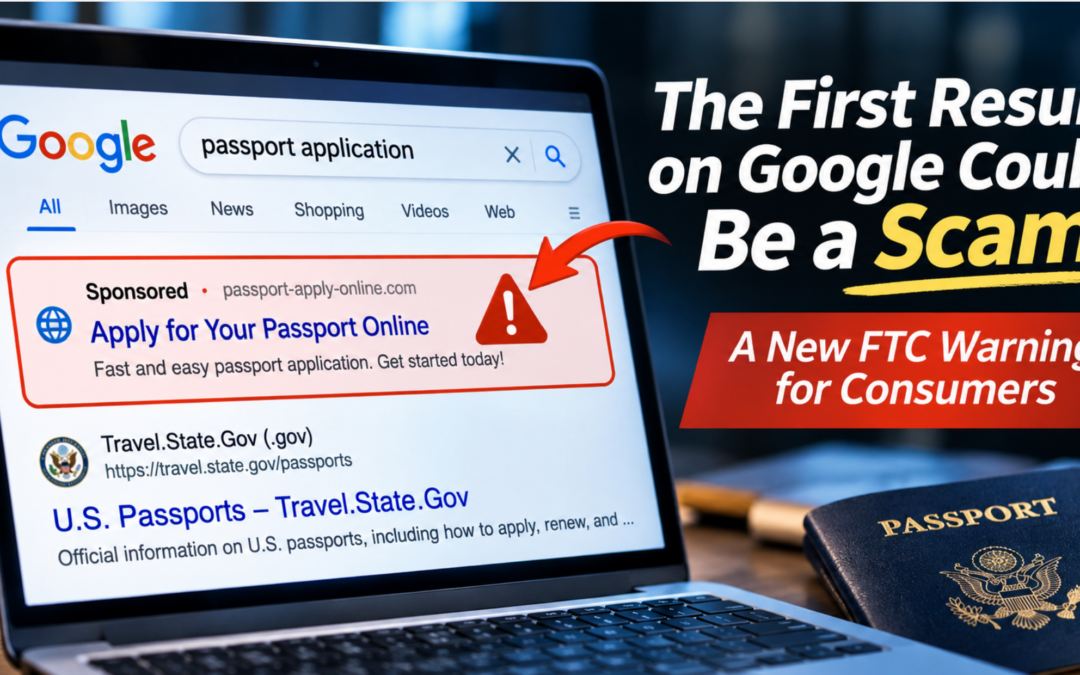
A new FTC warning for consumers
By Jeff Lanza, Retired FBI Special Agent and Cybercrime Expert | Published November 10, 2026
The short answer: Yes, the first result on Google can be a scam. Criminals pay for sponsored search ads that impersonate banks, airlines, and government agencies, and those ads can appear above the real website. The safest habit is to go directly to a website address you already trust instead of clicking the top result.
I recently returned from traveling overseas. Like most travelers, I rely on the internet to research destinations, find information, and make arrangements.
But here’s something worth thinking about: What if the first result you see on Google isn’t the company or government agency you were looking for, but someone trying to steal your money or personal information?
It’s happening. And the Federal Trade Commission has issued a new warning about it. As a cybercrime expert, I want you to understand how these fake Google ads scams work and what you can do about them.
How Fake Google Ads Put Scammers at the Top of Your Search Results
On November 2, 2026, the Federal Trade Commission (FTC) warned that scammers are placing advertisements on search engines, social media, and shopping platforms that impersonate legitimate businesses and government agencies. The FTC is also asking the public for input on whether search engines, social media companies, and online marketplaces should do more to vet advertisers and let people report imposter ads.
These ads can appear prominently in search results, sometimes above the actual website you’re trying to find. Think about that for a moment.
You search for your bank, an airline, a government service, or a company you do business with. You see a familiar name at the top of the results. You click. But you’re not necessarily going where you think you’re going. A criminal may have paid to put that link in front of you. This is what I call a sponsored search scam, a type of search result impersonation scam that relies on your trust in the top result.
A Real Example: Fake Passport Websites and Google Ads
On October 22, 2026, the FTC announced a lawsuit alleging that businesses offering passport-related services used misleading paid Google advertisements to make consumers believe they were dealing with the federal government or an authorized government-affiliated service.
According to the FTC’s allegations, consumers were directed to websites that charged fees and made misleading promises about passport services. These are allegations in a court case, not findings of liability.
The case illustrates an important point: A website can look professional, appear prominently in search results, and still mislead you about who operates it.
And while this particular case concerns travel documents, similar impersonation tactics can be used against people searching for financial institutions, customer service numbers, and other trusted organizations. Criminals are also getting better at building believable content with new technology, which I covered in 5 ways criminals use artificial intelligence to steal your money.
Three Things You Should Know Before Clicking a Search Result
1. The first result isn’t necessarily the safest result.
Search engines display paid advertisements as well as ordinary search results. Most advertisements are legitimate, but scammers can try to use them to reach potential victims.
2. A professional-looking website proves very little.
Criminals can create convincing websites with familiar logos, polished graphics, and realistic language. Even the padlock symbol or an HTTPS connection does not prove that a business is legitimate. Knowing how to spot fake websites starts with understanding that appearance is not proof.
3. Being asked to act quickly is a warning sign.
Be suspicious when a website or supposed representative pressures you to provide sensitive information, make an immediate payment, or contact a particular telephone number without giving you time to verify who you’re dealing with.
How to Protect Yourself From Fake Google Ads and Sponsored Search Scams
When looking for an important service online, consider these simple online fraud prevention precautions.
- Go directly to the source. Use a website address you already know is legitimate, or verify the official address independently. Bookmark the sites you use most, such as your bank.
- Pay attention to sponsored results. Don’t assume that an advertisement is trustworthy simply because it appears first.
- Verify before providing information. Be especially careful when a website requests passwords, financial information, Social Security numbers, or payment. Where it’s offered, passkeys can add protection against fake login pages. And if your information has already been exposed, see what the FBI data breach teaches about identity theft.
- Don’t rely on appearances. A familiar logo, a professional website, or even a convincing customer service representative is not proof of legitimacy.
What to Do If You Clicked a Fake Ad
If you think you visited or paid a fake website, stop and don’t give any more information. Change the passwords for any accounts you entered, contact your bank or card company about any payment, and report the scam at ReportFraud.ftc.gov. Reporting also helps investigators spot patterns.
Want your team, clients, or members to recognize scams like this? Jeff Lanza delivers engaging fraud prevention and cybersecurity keynotes that teach audiences how to spot online impersonation scams before they cost money. See Jeff’s speaking topics or book Jeff as your keynote speaker.
The Lesson From My Years in the FBI
During my more than 20 years as an FBI Special Agent, I learned that successful criminals don’t always need sophisticated technology. Sometimes, they just need to convince you that they are someone you already trust. And that’s precisely what makes online impersonation scams so dangerous. Whether you’re dealing with a telephone call, email, text message, video, or internet search result, the same basic principle applies:
Slow down. Use logic, not emotion. Verify before you trust.
That simple habit can make all the difference. To understand why even careful people get caught, read why smart people fall for scams. And since impersonation is not limited to websites, see how AI voice cloning scams fake a loved one’s voice.
Frequently Asked Questions About Fake Google Ads Scams
Are Google ads safe to click?
Most ads are legitimate, but scammers can pay for ads that impersonate real businesses and government agencies. For important services such as banking, travel, or government forms, go directly to a website address you already trust instead of clicking a sponsored result.
How can I tell if a Google ad is fake?
A fake ad can look identical to a real one. Warning signs include pressure to act quickly, requests for passwords, Social Security numbers, or immediate payment, and a website address you don’t recognize. When in doubt, verify the official address independently.
Does HTTPS or a padlock mean a website is safe?
No. The padlock and an HTTPS connection do not prove that a business is legitimate. Criminals can build convincing websites with familiar logos and realistic language.
How do I report a fake ad or impersonation scam?
Report it to the FTC at ReportFraud.ftc.gov, and use the reporting option on the search engine or platform where you saw the ad.
About the Author
Jeff Lanza is a retired FBI Special Agent and professional keynote speaker specializing in cybercrime, artificial intelligence, identity theft, and fraud prevention. His presentations help organizations, financial institutions, and consumers recognize scams and protect themselves.
Bring Jeff Lanza to your next event. Learn more about Jeff’s cybersecurity and fraud prevention keynotes, hear what audiences say, or contact Jeff to book a presentation. Want a free resource? Download Jeff’s identity theft and cybercrime handout (PDF), or browse more fraud prevention articles from Jeff Lanza.